Distances

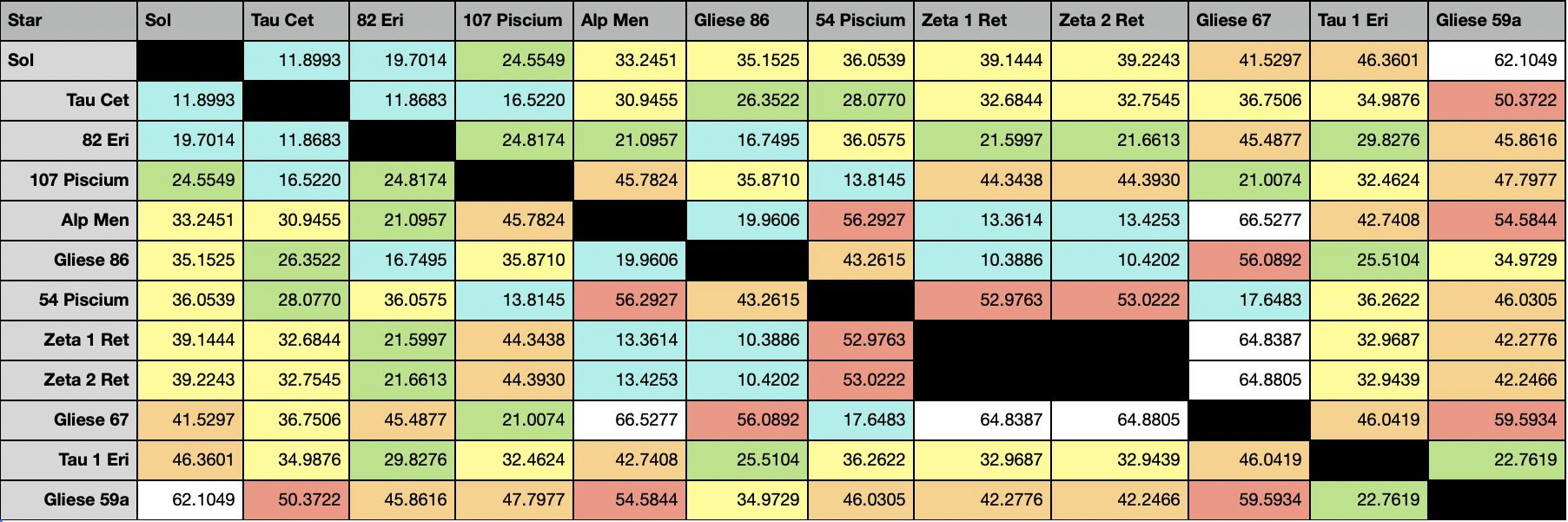
Here is a spreadsheet with the distances between all the stars in the Hill Map:
ID	hip	hd	hr	gl	bf		RA	Decl	dist	spect	x	y	z
0	0				Sol		0.000	0.000	0.000	G2V	0.000	0.000	0.000
3087	3093	3651	166	Gl 27	54 Piscium	0.656	21.250	11.060	K0V	10.156	1.762	4.008
7325	7339	9407		Gl 59.1	Gliese 59.1	1.576	68.948	20.657	G6V	6.798	2.975	19.278
7903	7918	10307	483	Gl 67	Gliese 67	1.696	42.613	12.739	G2V	8.466	4.028	8.625
7966	7981	10476	493	Gl 68	107 Piscium	1.708	20.269	7.532	K1V	6.371	3.056	2.609
8087	8102	10700	509	Gl 71	52Tau Cet	1.734	-15.937	3.650	G8V	3.154	1.540	-1.002
10116	10138	13445	637	Gl 86	Gliese 86	2.174	-50.824	10.783	K0V	5.738	3.671	-8.359
12810	12843	17206	818	Gl 111	1Tau1Eri	2.752	-18.573	14.221	F5/F6V	10.131	8.893	-4.529
15293	15330	20766	1006	Gl 136	Zet1Ret		3.296	-62.575	12.008	G2V	3.596	4.202	-10.658
15333	15371	20807	1010	Gl 138	Zet2Ret		3.303	-62.506	12.032	G1V	3.604	4.227	-10.673
15471	15510	20794	1008	Gl 139	82 G. Eri	3.332	-43.070	6.043	G8V	2.839	3.381	-4.127
29198	29271	43834	2261	Gl 231	Alp Men		6.171	-74.753	10.198	G5V	-0.120	2.679	-9.839
Building A 3D Map

Simple star plot code can be done using matplotlib …

import matplotlib.pyplot as plt
from mpl_toolkits.mplot3d import Axes3D

# Assuming you have a list of stars with their positions
# stars = [{'name': 'Star1', 'x': 10, 'y': 20, 'z': 30}, ...]

def plot_stars(stars):
    fig = plt.figure(figsize=(10, 10))
    ax = fig.add_subplot(111, projection='3d')

    for star in stars:
        ax.scatter(star['x'], star['y'], star['z'], marker='o')
        ax.text(star['x'], star['y'], star['z'], star['name'])

    ax.set_xlabel('X')
    ax.set_ylabel('Y')
    ax.set_zlabel('Z')

    plt.show()

# plot_stars(stars)

But a detailed, “real world”, map would need …

That sounds like an exciting project! Here’s a high-level approach to get you started:

  1. Data Collection: You’ll need a dataset of nearby stars. The Gaia Catalogue of Nearby Stars1 is a great resource for this. It provides a unique census of stars within 100 parsecs (326 light years) of our Sun1. For stars beyond this range, you might need to look for other astrometry databases or consider using a combination of databases.
  1. 3D Modeling: Once you have the data, you’ll need to create 3D models of the stars. There are several resources available online for free 3D star models23456. You can use these models as a starting point and customize them according to your needs.
  1. Visualization: For visualizing these 3D models, you could use a 3D graphics library. Three.js is a popular choice for web-based applications. You’ll need to map the star data to coordinates in your 3D space. Keep in mind that real-world distances will need to be scaled down to fit within the viewable area.
  1. Interactivity: To allow users to “go to” a star and view the sky from its perspective, you’ll need to implement a camera system within your 3D space. When a star is selected, you can animate the camera to move to the star’s position.
  1. Sky View Simulation: Simulating the sky view from another star is a bit more complex. One approach could be to use the positions of other stars relative to the selected star to plot their positions in a sky map. Tools like Stellarium7 and Hubble Skymap8 might provide some inspiration for this feature.

Remember, this is a high-level approach and each step will have its own set of challenges. But with some perseverance, it’s definitely achievable. Good luck with your project! 🌟

The Co-operative

Map

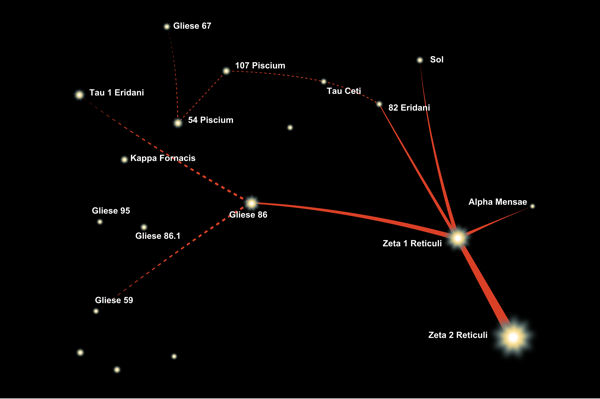
The systems of the Co-operative are taken from the stars visited by the Zeta Reticuli peoples.


Capital, home of the Co-opertive, is in the Zeta 2 Reticili system.

This is the pre-existing structure for the local interstellar group with the capital at Zeta 2 Reticuli c (known as Capital). The First Races hold sway and the worlds they found are the Second Races, and the worlds they found are the Third Races. When a new inhabited world is discovered, the discovering Race offers them help in exchange for service, effectively making them client states. They are limited to their Sponsor’s tech and systems.

First Races

There are 3 first races that established the Co-operative when they first met. They agreed to limit cross Race trade in favour of protecting their own colony worlds and maintaining control of them. When one of those colony worlds discovered another inhabited system, it became a Second Race and got more autonomy as long as it followed the existing Co-operative setup and rules.

1st Worlds

  1. Zeta 2 Reticuli = Capital
  2. Zeta 1 Reticuli = Zeta World
  3. Gliese 86 = Non-Zeta World

Second Races

These are colonies or inhabited worlds that were found after the formation of the Co-operative. They were raised to interstellar capabilities by their founding worlds and are closely tied into their economic and political systems.

2nd Worlds

  1. 82 Eridani (Z1R)
  2. Alpha Mensae (Z2R)

Third Races

These are colonies (and one inhabited world) that were founded or found by Second Race worlds. They are client states in the true sense, with little power (economically or politically), and mostly provide resources for their masters.

3rd Worlds

  1. Gliese 59 (G86)
  2. Tau 1 Eri (G86)
  3. Tau Ceti (82 Eri)

Colony Worlds

These are worlds that were colonized as they were habitable, but not inhabited.

  1. 107 Piscium (82 Eri)
  2. 54 Piscium (82 Eri)
  3. Gliese 67 (82 Eri)

Quarantined

This system has been quarantined for over 12,000 years.

  • Sol = Earth (human home world)